Energy Engineering
Select Your Desired Result
Choose your focus for today.
Track Energy
Track what builds or drains your energy.
Practice an Energy Reset
Use calming practices to reset your nervous system.
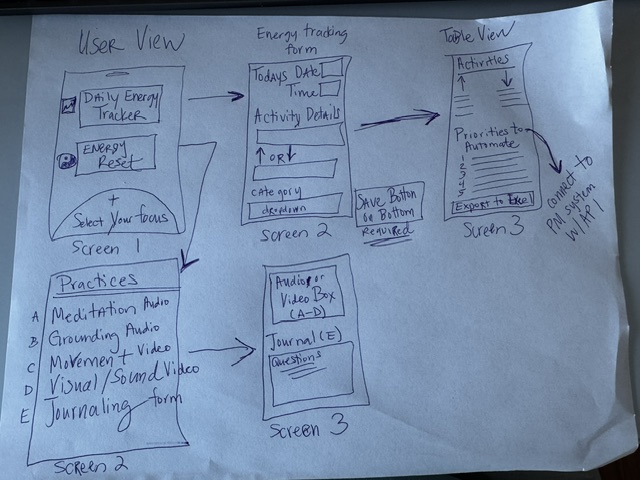
Low-Fidelity Prototype
Initial hand-drawn wireframe sketch exploring the Energy Engineering app flow and layout.
Core Function Draft
This core function supports the Energy Engineering app by helping users track activities that either build or drain their energy. The function collects user input, categorizes activities, stores tracking data, and prepares the information for AI-driven insights and prioritization.
function trackEnergyActivity(activityData) {

  // AI will help:
  // - categorize the activity
  // - determine if the activity is energy building or draining
  // - identify trends over time
  // - recommend automation or reduction opportunities
  // - generate personalized wellness insights

}
Function Mapping
The following functions map the major features of the Energy Engineering prototype to the technical functionality required to support the user experience.
Energy Tracking Form
Function: saveActivity()
Saves the user’s energy tracking input, including activity details, category, time, and energy impact.
Energy Impact Selection
Function: setImpact(type)
Updates the activity status as either energy building or energy draining.
Energy Dashboard Display
Function: renderActivities()
Displays all tracked activities in categorized lists and updates the dashboard dynamically.
Edit Activity Entries
Function: editActivity(index)
Allows users to modify previously saved energy tracking activities.
Delete Activity Entries
Function: deleteActivity(index)
Removes unwanted or incorrect activity entries from the tracker dashboard.
Energy Reset Practice Selection
Function: openPractice(title, time)
Loads the selected audio, video, or reset practice into the media player screen.
Journal Saving
Function: saveJournal()
Saves the user’s journal reflections and allows future editing of responses.
Screen Navigation
Function: showScreen(screenId)
Controls navigation between prototype screens and prevents dead-end navigation.
Project Notebook Navigation
Function: loadURL(element)
Loads different Design Thinking Notebook stages from the sidebar navigation.
AI Energy Insights
Future Function: generateAIInsights(activityData)
Analyzes user trends and recommends opportunities to reduce burnout, automate tasks, and improve wellbeing.
JavaScript Code Generation
For this activity, I used AI-assisted prompt engineering to generate JavaScript functionality for the Energy Engineering prototype. The application helps users track activities that either build or drain their energy while supporting wellness practices and future AI-generated insights.
Prompt Used
“I am building a web prototype for professionals experiencing burnout
and energy overload in the workplace. I need a JavaScript function
that saves user activity tracking data, categorizes activities as
energy building or energy draining, and dynamically updates a dashboard
display. Please provide the HTML setup and the JavaScript code.
You must include detailed, step-by-step comments in the JavaScript
explaining what each line of code does so I can learn from it and
debug it if necessary.”
AI-Generated JavaScript Code
function saveActivity() {

  // Collect the activity name entered by the user
  const activity = document.getElementById("activity").value;

  // Collect the selected date from the form
  const date = document.getElementById("date").value;

  // Collect the selected time from the form
  const time = document.getElementById("time").value;

  // Collect the summary statement entered by the user
  const summary = document.getElementById("summary").value;

  // Collect the selected activity category
  const category = document.getElementById("category").value;

  // Add the collected activity data into the activities array
  activities.push({
    activity,
    date,
    time,
    impact: selectedImpact,
    summary,
    category
  });

  // Clear the form fields after saving the activity
  clearForm();

  // Navigate the user to the Energy Tracker dashboard screen
  showScreen("trackerDashboard");
}
Reflection
The JavaScript functionality worked well overall and most of the core interactions functioned correctly on the first implementation attempt. Some troubleshooting was required for screen layout, responsive behavior, and proper placement of HTML and CSS sections within the prototype.
Using AI-assisted code generation helped accelerate the development process and improved my understanding of how frontend interactions connect to application logic. It also demonstrated how prompt engineering can support rapid prototyping while still allowing customization, debugging, and iterative refinement of the user experience.
Track an Activity
Energy Tracker
AI Insight
Your most common energy drain is meetings. Consider shortening or batching them.
Energy Trend
Energy Building Activities
Energy Draining Activities
Priorities to Free Up Energy
Energy Reset Practices
Choose a practice to reset and recharge.
Meditation Audio
10 min
Audio/Video Prototype
This would autoplay in the full version.